For this week my classmates Alejandro Avendaño, Obed , Esteban, Eduardo Triana, José Guadalupe and I, tried LAM and XMPI, that is another way to make a cluster.
For this week my classmates Alejandro Avendaño, Obed , Esteban and I tried XPVM, that is grapchical way of pvm, we had some troubles but at the end it works :)
For this week my classmates Alejandro Avendaño, Obed and I, tried PVM (Parallel Virtual Machine) that is a virtual machine used for running applications, share resources, processors and memory. It's like a heterogeneous cluster.
We install, configure and ran pvm; also we use Hamachi and SSH to run PVM in our houses without having to be all three together.
The steps that we follow are in the wiki. Here is the link: PVM
Also here are the links to my posts for laboratory
This are two of the early successful Beowulf clusters.
Avalon
This cluster was built in the The Alamo National Laboratory in the years 1997-98,was the first in the famous list of 500 fastest computers in the world where ranked 315, the list in the first half of 1998, a fact of great importance, because the clusters found that, besides being cheaper, could compete in performance, at least insome applications, the parallel computers of the most recognized manufacturers in the world.
In the initial stage of Avalon 70 computers were connected through a switch Fast Ethernet (100 Mbps), each with an Alpha processor at 533 MHz, 128 MBytes of RAMand 3.2 GBytes of hard disk (almost 9 GBytes of RAM and more 200 GBytes of storagein total). In the second stage, Avalon has grown to 140 processors
Avalon ranked at #113 on the TOP500 supercomputers list in November 1998, at 48,600 Mflops and in March 2000 Avalon ranked at #265 on the TOP500 list. In July 2001, the end of the top500 list is at 68 Gflops.
Avalon currently provides over 18,000 node-hours of production computing time per week, split among about 10 production users. Avalon provides 4000 node-hours of development time per week for another 40 users.
A little of history...
In April 1998, Avalon performed a 60 million particle molecular dynamics (MD) simulation of shock-induced plasticity using the SPaSM MD code. This simulation ran for a total of 332 hours on Avalon, computing a total of 1.12 x 10 ^16 floating point operations.
Also in April 1998, Avalon performed a gravitational treecode N-body simulation of galaxy formation using 9.75 million particles, which sustained an average of 6.78 Gflops over a 26 hour period.
Talking about costs....
Initial hardware cost of about $300k. Initial software cost of $0. Power and space for the machine are estimated to be about $20k/yr.
All of the hardware and software maintenance on the machine is performed in the spare time of four people, averaging less than 10 man-hours of labor per week
Loki
Loki project was built in The Alamos National Laboratory in New Mexico in 1996. This cluster was integrated by 16 Intel Pentium Pro microprocessors and had a sustained performance of over one gigaflops at a cost less than $ 55 000 dollars.
Loki was a 16-node parallel machine with 2GB RAM and 50GB disk space. Each node is essentially a Pentium Pro computer optimized for number crunching and communication. Here is a list of some of the parts of each node:
Intel Pentium Pro 200MHz CPU with 256K integrated L2 cache
Cogent EM400 TX PCI Quartet Fast Ethernet Adapter.
SMC EtherPower 10/100 Fast Ethernet PCI Network Card.
S3 Trio-64 1MB PCI Video Card.
This list purchase price of Loki's parts in September 1996 was just over $51,000.
The nodes were connected one to another through the four-port Quartet adapters into a fourth-degree hypercube. Each node is also connected via the SMC adapter to one of two eight-port 3Com SuperStack II Switch 3000 TX 8-port Fast Ethernet switches, which serve the dual purpose of bypassing multi-hop routes and providing a direct connection to the system's front end.
The software that runs this cluster is Linux. It use the standard Linux software tools and the GNU programming tools. The kernel has not been modified from its form in the Linux distribution.
This image is an intermediate stage of a gravitational N-body simulation using 9.75 million particles. It took about three days to compute on Loki at a sustained rate of about 1 Gflop.
First of all MPP stands for Massively parallel processing. In the course we are developing a Cluster, but an MPP is another way to develop a distributed memory computer system that consists of many individual nodes.
MPP is a type of computing that uses many separate CPUs running in parallel to execute a single program. Like I wrote before a MPP is a distributed memory computer system that consists of many individual nodes, each node is an independent computer (each node has at least one processor), its own memory, and a link to the network that connects all the nodes together.
MPP systems have been designed to go up to hundreds, in some cases thousands, of processors.
Each node runs its own copy of the OS kernel or microkernel. The nodes communicate by passing messages, using standards such as Message Passing Interface (MPI).
In this class of computing, all of the processing elements are connected together to be one very large computer. In this type of computing a processor cannot directly access the physical memory located in a remote node. The programmer or the compiler has to instruct the machine to transfer data from one node to another node on need basis. Faster and well controlled interconnects in MPPs have led to some attempts in providing a shared memory look-alike programming model on these machines. However, these attempts suffer from scalability and availability concerns.
At this point you may be wondering about the difference between a cluster and a MPP, well here ate the differences...
In a cluster various components or layers can change relatively independently of each other, while components in MPP systems are much more tightly integrated. For example, a cluster administrator can choose to upgrade the interconnect just by adding new network interface cards (NICs) and switches to the cluster. On the other hand, in most cases the administrator for an MPP system cannot do such upgrades without upgrading the whole machine.
Cluster management tools and parallel programming libraries can be optimized independent of the changes in the node hardware itself. This results in more mature and reliable cluster middleware software as compared to the system software layer in an MPP class system, which requires at least a major rewrite with each generation of the system hardware.
An MPP usually has a single system serial number used for software licensing and support tracking. Clusters have multiple serial numbers, one for each of their nodes.
In MPP system, many computers are physically housed in the same chassis. A cluster system is physically dispersed.
The main difference is that a cluster is a set of computers with one or more processors,while a station is a single MPP machine composed of many processors
In some ways an MPP could come to regard as a cluster of processors rather than a cluster of machines
In MPP operation, the problem is broken up into separate pieces, which are processed simultaneously. In order to use MPP effectively, an information processing problem must be breakable into pieces that can all be solved simultaneously. In scientific environments, certain simulations and mathematical problems can be split apart and each part processed at the same time.
In an MPP system, a file system is commonly shared across the network. This configuration allows program files to be shared instead of installed on individual nodes in the system.
In an MPP system work distribution between nodes is a vital consideration when designing any application. It should take into account the synchronization of data between nodes, and all communication between them must be done explicitly by calls to message passing mechanism.
Nowadays, the MPPs are the world's largest computers. Have hundreds or thousands of processors connected to hundreds of gigabytes of memory
This week my classmate Alejandro Avendaño and I decided to implement Hamachi + SSH and we follow the Cluster Beowulf Tutorial (both are on the wiki) to make a Beowulf Cluster via Hamachi.
We made 2 changes, first instead of use our ip we use the aHmachi ip's and instead of creating the new user Cluster, we made it graphically from the User and Groups option in the System menu of Ubuntu.
In the cluster we made, I was the master node and Avendaño was the slave. Finally we started a daemon using this:
mpd &
And we started de cluster with this: $ mpdboot --verbose -n 2
And for verifying the nodes of the cluster, we write this in the terminal:
mpdtrace
To test the cluster we run a python program that makes an image of a fractal
This week my contribution to the class is in the section of Posix Threads. My contribution is a program about how to pass arguments to pthreads. In the code I is a little explanation about what does the program does.
MySQL Cluster is a version of high availability, high redundancy of MySQL adapted for the distributed computing environment.
MySQL Cluster is a technology that enables clustering of in-memory databases in ashared-nothing environment. The shared-nothing architecture allows the system manager database (DBMS) to work using no expensive hardware and software minimum requirements both as hardware.
This cluster also have no single point of failure, so each component has its own memory and disk. Because this scheme is not recommended to use shared storage mechanisms such as shared folders over a network, network filesystems, etc.
This cluster uses the NDB Cluster storage engine to enable running several MySQL servers in a cluster.
Basic architecture
This type of cluster consists of a group of machines, each one of them running anumber of processes including MySQL servers, storage nodes for NDB Cluster,management servers, and running specialized programs access to data.
All these programs work together to form a MySQL Cluster. When data is stored in theNDB Cluster storage engine, the tables are stored in the data nodes. These tables are directly accessible from all other MySQL servers in the cluster. Therefore, if an application updates a field in a table, all other MySQL servers that query this data cansee the change immediately.
The cluster can handle failures of individual data nodes with no other impact but few transactions aborted due to the loss of transaction status.
Main components
NDB storage engine Is a memory storage engine offering high availability and data persistence features.
Also in a minimum configuration, its necessary 3 types of nodes (one of each of them):
Management node (MGM) The main function of these nodes is to manage the other nodes within the cluster, such as providing configuration data, starting and stopping nodes, running backups, etc.
Data node This kind of node stores cluster data.
SQL node This is the node that access the cluster data. In MySQL Cluster, a node is atraditional MySQL server that uses the NDB Cluster storage engine
Basic Operation
The management server (MGM node) manages the cluster configuration file and the log. Each node in the cluster configuration data received from the management server,and need a way to determine where the management server resides. When interesting events occur in the data nodes, the nodes transfer information about these events to the management server, which stores the information in the cluster log.
Main processes
MySQLD For use this process a MySQL Cluster, you need to be specially constructed to withstand the NDB storage engine.
Also known as MySQL Server, is the main program that does most of the work in a MySQL installation. MySQL Server manages access to the MySQL data directory that contains databases and tables.
When MySQL server starts, it listens for network connections from client programs and manages access to databases on behalf of those clients.
NBD Is responsible for handling all table data using the cluster ndbd engine. This process supports transaction management functionality distributed between the nodes, node recovery defective or offline, checkpoint to disk, online backup and other tasks related to the distribution of the cluster.
NDB_MGMD This is the process that controls the management server and is responsible to know and maintain the cluster configuration and distribute such information to all nodes that request to join the cluster. It also maintains the log of cluster activities and reports its status to the clients connecting.to it.
Here is a video explaining the operation of MySQL Cluster and also they explain its advantages:
Also here is a tutorial to install MySQL Cluster in Linux:
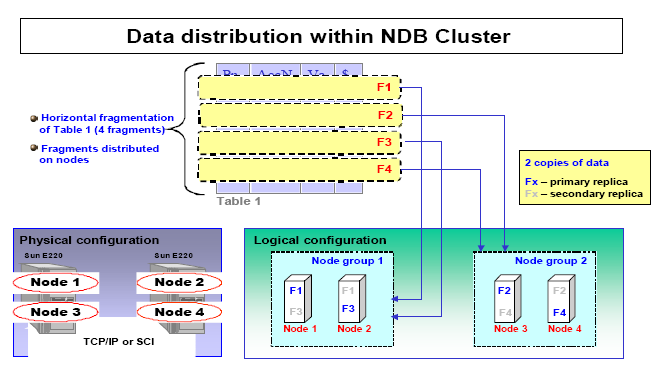
NDB Cluster is a relational database with tables of records. Table rows represent tuples of relational data stored as records. When created, the attribute schema of the table is specified, and thus each record of the table has the same schema.
A Cluster NDB database is a collection of 3 types of nodes:
One or more management servers (nodes MGM)
One or more database / storage nodes (DB nodes)
One or more applications (API nodes)
It should be noted that a node is a program running on any computer. The nodes can run on different computers (or the same) and communicate throughsoftware modules called "transporters".
This type of cluster is a memory storage engine offering high availability and data persistence. It is highly configurable offering a number of options for dealing with load balancing andfault tolerance
Node MGM
This kind of node performs the function of managing, controlling and coordinating the other nodes within the cluster. Implements data configuration functions, start or stopother nodes within the cluster, perform backups, or other administrative tasks. Because it controls and shapes the rest of the nodes must be started before any other nodes
DB nodes
This type of node stores the data. The number of nodes in this type within the cluster is equal to a number of replicas by the number of fragments, for example, handled 4 replicas of the data with 2 fragments would require 8 data nodes. No need to handle more than one replica.
API Nodes
This nodes are used to access cluster data.
How it operates?
Data is synchronously replicated between storage nodes, this minimizes problems of falls by fail-over.
The nodes are designed using an shared-nothing architecture.
No failure points (points of failure). Any node can be deleted without loss of data exist and without stopping the applications that use the base.
The use of SQL is transparent which simplifies the work of developers and DBAs.
Applications connect to the server regardless of specific details of how information is stored or such as network connections.
This allows an application to be "portable" between environments where there is or not and where there is replication or clustering.
Shared nothing architecture
Is a distributed computing architecture in which each node is independent and self-sufficient, and there is no single point of contention across the system. More specifically, none of the nodes share memory or disk storage.
A SN system can scale almost infinitely simply by adding nodes in the form of inexpensive computers, since there is no single bottleneck to slow the system down.
Node and System Recovery
When a node has a fault, to recover all information restores the help of other nodes.
As in the version without cluster, error logs and it handles that keep the inf complete and consistent
The cluster uses "based on pessimistic locking concurrency controls."
Concurrency Control
NDB Cluster uses pessimistic concurrency control based on locking. If a requested lock (implicit and depending on database operation) cannot be attained within a specified time, then a timeout error occurs.
Concurrent transactions (for example parallel application programs, thread-based applications, or applications with asynchronous transactions) sometimes deadlock when they try to access the same information. Applications need to be programmed so that timeout errors occurring due to deadlocks are handled. This generally means that the transaction encountering timeout should be rolled back and restarted.
This week, my contribution is again about POSIX. I added a little more information about Threaded Programs in Parallel Programming and I added a section about thread management that includes information about how to create and end threads and also a little program of hellowrld in c using this POSIX threads.
My contribution of this week to the class was about POSIX Threads or Pthreads.
Already in the wiki was some information of this subject, but it was very little and I've added more information to understand the subject and in the following weeks I'll be adding a small program as a tutorial to better understand its use.
This week, my contribution is a tutorial for MPI programs in C. I did it because I saw that most programs that my most of my classmates upload to the wiki but didn't explain the lines and base lines that these programs should have.
In the tutorial I explain a simple Hello World in c running in 5 nodes, but I'll we posting more codes and explaining them.
Here is the link on the tutorial: MPI in C Tutorial and also an image of the program running
Esta semana lo único que realicé fue traducir un articulo de la wiki e instalar MPI de Python (siguiendo una parte del tutorial que está en la wiki MPI Python) y correr programas de ejemplo de mpi en Python, pero aún no he realizado ninguno. Lo que traduje fue el articulo DFS
En esta semana mi aporte es de nuevo en la sección de Lenguajes. Corregí el programa que había realizado la semana pasada de Productor-Consumidor usando threads y ya funciona correctamente.
No es la implementación mas óptima ya que las clases toman turnos para realizar sus tareas, pero es una de las posibles soluciones. Espero poder realizar otra de las implementaciones de este programa, como por ejemplo que los dos esten interactuando sin tomar turnos.
Bueno aqui les dejo impresiones de pantalla del programa funcionando.
Para esta semana mi aporte fue en la sección de Lenguajes. Comencé a realizar el programa de Productor-Consumidor en java haciendo uso de hilos, pero aún tengo problemas en ello.
Lo que he realizado es crear dos clases e iniciar los hilos pero no he logrado que se alternen para ir aumentando y disminuyendo un contador, ya de tanto moverle lo rompí varias veces.
De tanto moverle lo deje de esta manera por cuestiones de tiempo y esto es lo que hace hasta el momento
Lo seguiré mejorando hasta que quede funcionando al 100%
Aqui el link a la wiki de lo que realicé esta semana
Esta semana mi aporte fue en el equipo cluster. Lo que realizé fue lo siguiente:
Modifique ciertas partes donde encontré errores de sintaxis.
Amplié el tutorial para crear el cluster, aclaré los pasos donde se configuran las ip's de todos los nodos en el archivo hosts en etc, como crear dos archivos necesarios que son .mpd.hosts, .mpd.conf
Además junto con mi compañero Eduardo Triana resolvimos el problema del puerto 22, que nos aparecía al intentar entrar en algunas de las computadoras con ssh.
Mis aportes fueron en las sección de: Network Configuration
Este es el error del puerto 22, que después se corrigió al desactivar el firewall del módem:
Y aquí el problema que tenemos al intentar ejecutar ssh para intentar entrar a otra computadora, estamos trabajando en ello, el error es que no sabemos que password nos pide para entrar, ya que no acepta el de la computadora al que queremos entrar y al parecer pide una llave pública que no conocemos:
Bueno este es el reporte de la primera semana, esta semana nos juntamos en la biblioteca a realizar un Beowulf Cluster.
Mi aporte fue el de permitir que todos los nodos pudieran compartir archivos mediante ssh, todo esto esta documentado en la wiki en la sección de clusters.
Tambien en lo practico me toco ser el nodo maestro y para comprobar que realmente funcionaban los permisos me meti en las computadoras de mis compañeros Eduardo Triana y Pepe Gonzalez y las apagué :P aqui las pruebas de esto:
Al hechar a andar el Beowulf Cluster tuvimos un problema ya que nos tiraba un error, aunque ya estamos buscando com solucionarlo y tenerlo funcionando lo mas pronto posible.


 In the initial stage of Avalon 70 computers were connected through a switch Fast Ethernet (100 Mbps), each with an Alpha processor at 533 MHz, 128 MBytes of RAMand 3.2 GBytes of hard disk (almost 9 GBytes of RAM and more 200 GBytes of storagein total). In the second stage, Avalon has grown to 140 processors



 Basic architecture